Open upload and choose a file
Sign in, open “Upload local audio or video” and use the file picker or drop area. Choose one audio or video file. Guests return to this entry after sign-in; no file is sent automatically.
Turn audio you are entitled to process into searchable, selectable text. Check the file, review its duration and allowance, then explicitly confirm transcription.
Vidleaf accepts MP3, M4A, WAV, AAC, FLAC, OGG, Opus, AMR and WMA audio. You can also choose an MP4 or MOV video: the page extracts the audio track on your device and uploads only the sound, never the video. Audio files are limited to 60 MiB each; AAC audio in an M4A file and tracks extracted from a video are not limited to 60 MiB when their average bitrate is 320 kbps or less, and follow the per-asset duration limit instead. Free allowances, Pack S and Single Pass support assets up to 120 minutes. Valid Pack L transcription credits support uploads up to 180 minutes, provided you have enough L minutes for the entire task when you submit it. A file-duration limit is separate from your remaining allowance: being able to upload does not mean you already have enough transcription minutes.
Sign in and open audio or video upload →Check allowances and packs
Sign-in is required. This link opens “Upload local audio or video” in the workbench. Returning from sign-in restores that entry without selecting a file, accepting terms or starting transcription for you.
Re-encoding unclear speech will not restore missing words. Review distant voices and overlapping conversation against your original recording.
Sign in, open “Upload local audio or video” and use the file picker or drop area. Choose one audio or video file. Guests return to this entry after sign-in; no file is sent automatically.
When consent is needed, the separate notice describes the processors, data and purpose before the selected audio is uploaded. You can decline and choose again later. Accepting this notice is distinct from confirming the transcription allowance for this particular task.
After upload and file checks, review the detected duration, estimated transcription usage and available allowance. Confirm processing only when these are acceptable. If purchased credits are needed, follow the displayed source and authorization controls. A completed upload alone does not start recognition.
If the same account already has a usable result for the same file, uploading it again may open that result without creating another transcription task. Private results are not shared between different accounts through this reuse.
These screenshots show the current frontend in an isolated demonstration. File names, duration and allowance values are illustrative. No transcription, provider request or payment was submitted; these are not actual task or account records.
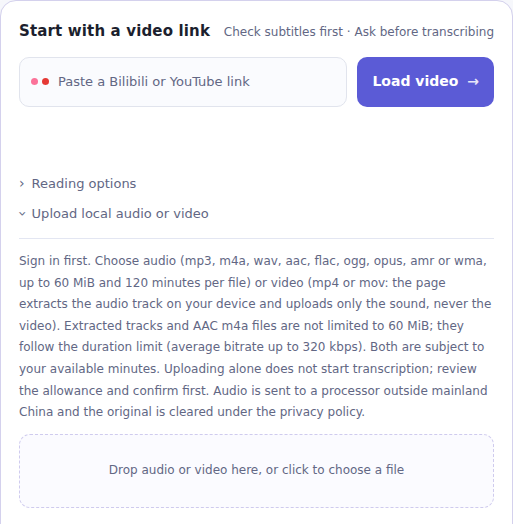
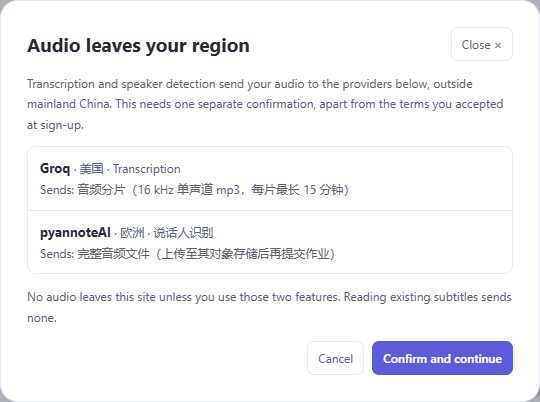
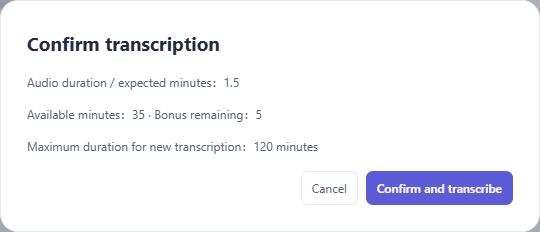
This section is not a demonstration. On 25 September 2026 the recording below was uploaded, transcribed and exported on vidleaf.app with the site operator's account. Recognition services change, so the same file may give different results later.
The recording is Abraham Lincoln's Second Inaugural Address from LibriVox, read by John Greenman (Internet Archive item): an MP3 of 7 minutes 9 seconds, about 6.9 MB. Both the recording and the speech are in the public domain. The transcript was compared with the text on Wikisource, taken from Lincoln's Life and Works.
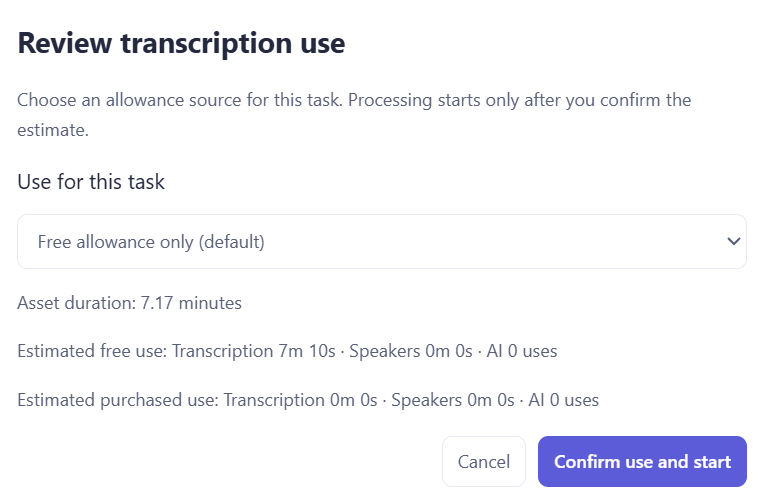
The task finished about 7 seconds after confirmation, going by the created and completed times in the task record, and produced 47 timestamped lines. Lines 1–3 are the LibriVox introduction and line 47 is the closing announcement; remove them when you need only the speech.
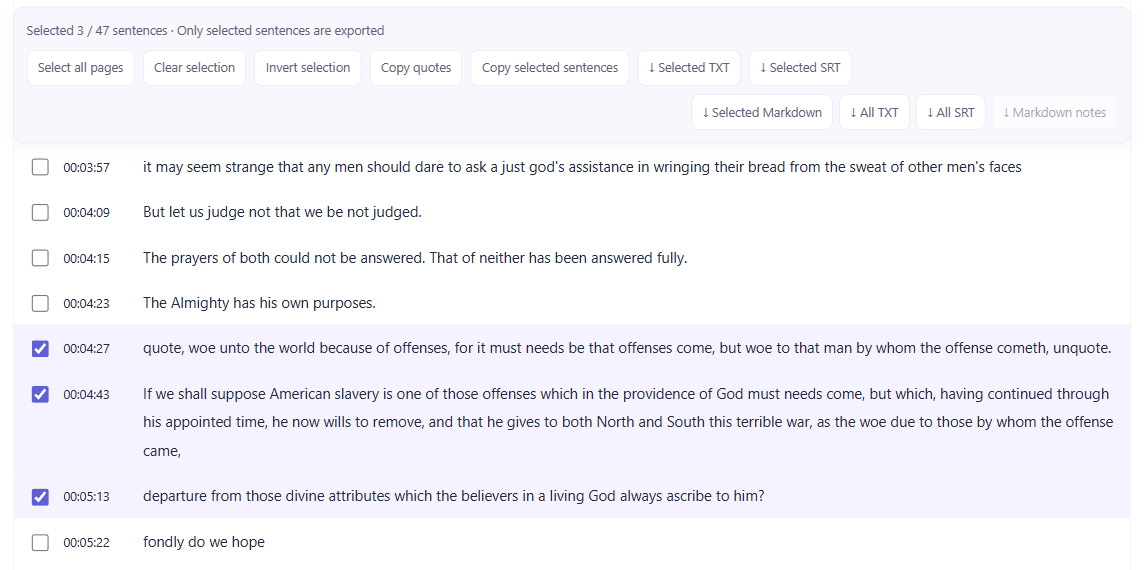
The reader spoke 705 words of the address. The transcript missed 5 of them and had no other word errors, a word error rate of about 0.7% when capitalization and punctuation are ignored. All five missing words fall at the end of the 04:43 line, which lasts exactly 30 seconds. The next line starts with “departure”, so the sentence loses its question.
Four differences from the printed text were not counted as errors, because the reader said them that way and a second, independent speech model heard the same words: “quote … unquote” around the two quotations, “bondsman's” for “bondman's”, “suppose American slavery” without “that”, and “a just and a lasting peace”.
| Line | Transcript | Original text | What to fix |
|---|---|---|---|
| 04:43–05:13 | …by whom the offense came, / departure from those divine attributes… | …by whom the offense came, shall we discern therein any departure from those divine attributes… | Five words missing at the end of a 30-second line |
| 03:46 | both read the same bible and pray to the same god | Both read the same Bible, and pray to the same God | Capitalize the proper nouns |
| 03:57 | a just god's assistance | a just God's assistance | Capital letter |
| 01:52 | saving the union without war | saving the Union without war | Capital letter |
| 04:27 | quote, woe unto the world … cometh, unquote. | “Woe unto the world … cometh.” | Spoken quotation marks: use punctuation when quoting |
The exported SRT, unedited (lines 33–34):
33
00:04:43,324 --> 00:05:13,324
If we shall suppose American slavery is one of those offenses which in the providence of God must needs come, but which, having continued through his appointed time, he now wills to remove, and that he gives to both North and South this terrible war, as the woe due to those by whom the offense came,

34
00:05:13,324 --> 00:05:21,796
departure from those divine attributes which the believers in a living God always ascribe to him?
This was one speaker reading clearly in a quiet recording. Meetings, interviews and noisy audio are harder, so check the original recording before publishing or quoting.
| Item | Current boundary | What to check |
|---|---|---|
| File format | MP3, M4A, WAV, AAC, FLAC, OGG, Opus, AMR or WMA audio. From an MP4 or MOV video, only the AAC audio track extracted on your device is uploaded. | If a video's sound is not AAC, export the audio first. Do not just rename an extension. |
| File size | Audio files: up to 60 MiB, and Pack L does not raise this limit. AAC audio in M4A and extracted tracks at an average of 320 kbps or less follow the per-asset duration limit instead. | Check file properties; convert WAV to an AAC M4A or divide the recording locally if needed. |
| Ordinary duration | Free allowances, S and Single Pass: up to 120 minutes per asset. | Check your remaining minutes separately from this duration ceiling. |
| Long audio with L | Up to 180 minutes with valid L transcription credits. A task over 120 minutes uses L transcription minutes for the entire recording. | You need enough L minutes at submission; free, S and Single Pass cannot fill the shortfall for that long task. |
| Speaker detection | Available once the transcription has finished. The original is kept for at most around six hours after upload; after that, upload the same file again (a file already transcribed is not charged again). | Speaker detection is metered by duration as an entitlement separate from transcription; run it within the window, or re-upload first. |
| Original playback | No playback of the original after cleanup. | Keep your own authorized recording for checking the transcript. |
| File inspection | Unreadable streams, incomplete exports or unknown duration can cause rejection. | Verify local playback and export a complete audio file before trying again. |
| Output accuracy | Words, punctuation and timestamps may be incorrect. | Review important passages before publishing, quoting or delivering the text. |
Suppose your recording lasts 150 minutes and the file is within the upload size limit. Remaining free minutes or S minutes cannot be combined to fund that task over 120 minutes. You need enough L transcription credits for all 150 minutes, and the task must pass the usage check when submitted. The 180-minute L ceiling is a per-asset limit, not an extra free allocation for every recording.
For ordinary tasks up to 120 minutes, weekly and signup allowances are normally used first, followed by eligible purchased credits. The confirmation shows the applicable source and expected usage. Availability can change when another task reserves credits or an entitlement expires, is consumed or becomes frozen. If processing is unavailable, check “My account → Allowances & usage” before submitting again.
A Single Pass binds to one asset on its first actual use and has separate start and completion windows. Summaries and translations use AI calls, while speaker detection is a separate entitlement. Finishing transcription does not make every later operation free. See the current plans and purchase confirmation for availability, prices and refund terms.
Search the finished text for names, dates, amounts, technical terms and negations, then listen to those passages. A missing “not” or an incorrect decimal changes meaning. Overlapping speech may be combined into one segment; paragraph order is not evidence of who said something.
Use “All TXT / All SRT” for the complete result without selecting every line. For an extract, select relevant lines and export that selection. TXT is convenient for editing; SRT includes timestamps for caption tools. Recheck timing after merging, deleting or changing captions.
The following illustrates the SRT structure; it is not output from a real recording:
1
00:00:00,000 --> 00:00:02,400
[first recognized passage]

2
00:00:02,400 --> 00:00:05,100
[second recognized passage]
Summaries compress the source and translations change its wording. For a direct quotation, check the transcript against the original audio instead of treating a summary as verbatim speech.
Transcripts, translations and summaries from local uploads are restricted to the uploading account. Originals are temporarily stored on the server for at most around six hours after upload: a successfully transcribed original stays available for speaker detection during that window, while one whose transcription failed or was cancelled is deleted at once. Outages or storage faults can delay cleanup. Processed text is stored separately, so removing the original audio does not itself delete the transcript.
Hiding an item in “My tasks” hides the history entry rather than deleting its saved text. Follow the privacy policy's retention and deletion instructions to request removal of processed results. For troubleshooting, start with the task status, error message and time of the problem. Avoid sending private recordings, credentials or unnecessary personal information in an initial support message. The current audio notice and privacy policy describe processors and purposes.
After upload, review duration and usage before confirming transcription. If already submitted, check its status in My tasks. Selecting the file again will not accelerate a running task.
A duration ceiling is not an automatic credit allocation. Other tasks may reserve minutes and entitlements may expire. Check weekly, signup and purchased allowances, then review the current confirmation.
Read the error and check My tasks first. An incomplete upload differs from a lost response after submission: the latter may leave a task running on the server. A browser disconnect does not prove no task was created. Avoid repeated submissions until you have checked the existing task, then address any network or file-export problem.
Once the transcription has finished you can run automatic speaker detection. It only separates who speaks when; it does not identify real names from voices. The original is kept for at most around six hours after upload; after that, upload the same file again to run it. Verify any attribution against your own recording.
Cancelling before the start confirmation creates no transcription task. After submission, cancellation depends on the processing stage; work already accepted by a provider may continue and incur cost. Use task status and account usage records to check the outcome. Closing a page is not a cancellation request.
A usable result under the same account may open directly. Changing the file or switching accounts can prevent reuse. Another user's private result is not exposed to you.
Open audio uploadCheck allowances and plansRead existing YouTube captionsRead Bilibili captionsContent rules