Check the transcript source
Choose an available track. If there are no captions, decide separately whether to transcribe the audio. The reader identifies the text source.
Read the source first, then create an outline you can check against the video.
Choose an available track. If there are no captions, decide separately whether to transcribe the audio. The reader identifies the text source.
Sign in and generate it from the Summary tab. Track progress or cancel processing; read an existing summary directly when one is available.
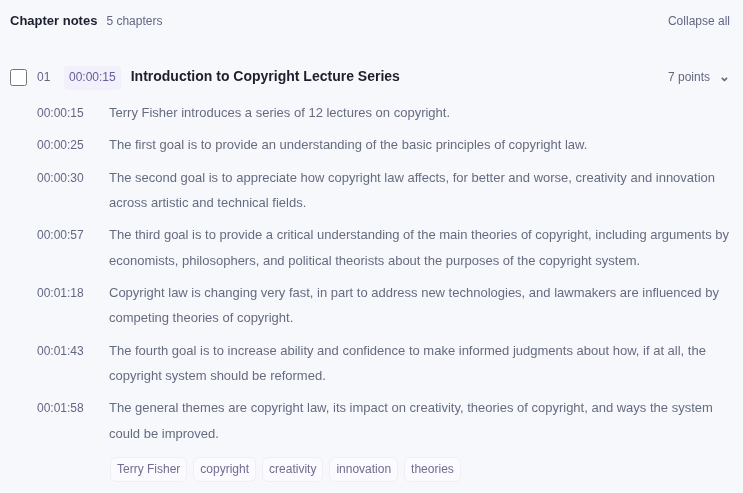
Use chapters and timestamps to check the original passage. A summary is a paraphrase of key points, not a verbatim quotation.
Excerpt of an existing generated summary: At the exact moment the first bomb falls, CNN loses its Baghdad feed.
At 0300, the precise moment the first bomb should be falling on target, CNN lose the live feed from their reporter on the ground.
The quotation is a caption excerpt. The summary above is a paraphrase; check the video at 08:51.
Source: Desert Storm - The Air War, Day 1 - Animated · The Operations Room · English automatic captions.This section is not a demonstration. On 27 September 2026 an AI summary of the lecture below was generated on vidleaf.app with the site operator's account, then checked point by point against the captions. The screenshots were taken the same day by opening the saved summary as a guest. Models and prompts change, so a summary generated later may differ.
The lecture is the one in the transcript page's real run: William Fisher, CopyrightX: Lecture 1.1, The Foundations of Copyright Law: Introduction (12 min 27 s, 250 English human captions), published on YouTube by the Berkman Klein Center for Internet & Society under a Creative Commons Attribution 3.0 license.
Before anything was generated, a confirmation showed the asset duration (12.45 minutes) and the estimated use: one AI call. The job finished in about 8 seconds. The result had a five-sentence overview, 10 keywords, 5 chapters and 34 points, each point with a timestamp, and was labelled “AI-generated”.
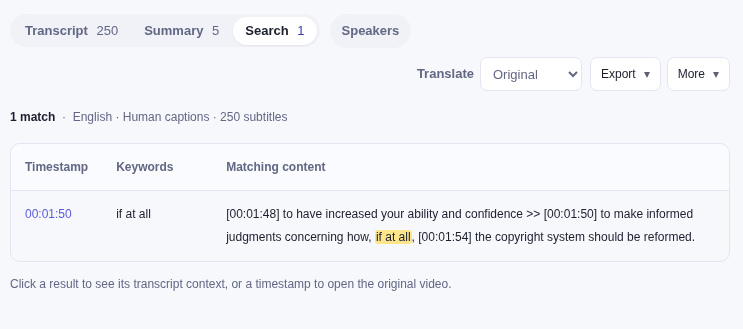
To check a point, search for its key words and read the captions around them. Searching for "if at all", in double quotation marks, returned one line:
| Check | Result |
|---|---|
| Qualifiers kept | “For better and worse”, “in part”, “if at all” and “seems” are kept in the points stamped 00:00:30, 00:01:18, 00:01:43 and 00:05:53. |
| Qualifiers left out | At 00:01:28 the lecturer says lawmakers “are influenced by and in turn help to shape” the competing theories of copyright; the point keeps only “influenced by”. From 00:07:27 he says he will mostly refer to US rules, partly because, “for better or worse”, US law is influential elsewhere; the point at 00:07:43 keeps only the attention he will also give to other legal systems. |
| Wording | The Lecture 11 point says secondary liability “sometimes controls organizations that facilitate infringement”. In the lecture (00:06:16–00:06:26), the doctrine enables copyright owners sometimes to control the behavior of such organizations. |
| An earlier summary | A summary of the same lecture generated earlier that day, before the summary prompt was changed to keep qualifiers, dropped the four qualifiers in the first row and cut two points at 200 characters, in the middle of a word (“Latin A”, “technological p”). None of the 34 points is cut now; the longest has 243 characters. |
A YouTube video summarizer with timestamps can make a long lecture or interview easier to navigate. The timestamp is a route back to the evidence, not a certification that the summary is accurate. A chapter title may simplify a discussion that has several exceptions. Read enough of the surrounding material before using a point in an article, study note or report.
When a caption is wrong, a fluent summary may repeat that mistake. Check the transcript's source label before interpreting the output. A human caption track, automatic platform captions and an audio transcription are distinct sources and may disagree on wording or segmentation. The generated summary is not a substitute for an independent review of the original.
| Your situation | Next step |
|---|---|
| You can already read a transcript | Open Summary and choose generation after checking your AI allowance. |
| A summary exists but you need another language | Check for a saved translation, then choose summary translation if needed. There is no need to reread the audio. |
| The check confirms there are no captions | Review audio processing, duration and transcription minutes separately. After transcription, choose whether to summarize. |
| The caption check failed or the platform requires verification | Keep the URL and retry after the access problem is resolved. This is not evidence that captions are missing. |
| A task is taking longer than expected | Check its progress or task history before submitting again. Use Cancel if you want to stop. |
Cancellation preserves completed content, but work already submitted to a provider may still finish and incur a charge. A delayed display is not a reason to click Generate repeatedly. Saved results are reused where available; inspect the current track and task state before starting the same processing again.
Use the summary's Markdown notes for an outline. Use Selected Markdown for source quotations. In either case, keep the video title, link and source label with the exported material. If you edit a generated point, do not put it in quotation marks as though it were the speaker's exact words.
The YouTube transcript tool explains selection and export formats. The bilingual-notes guide shows how the same reader keeps the original and its labelled machine translation together.
Creating a new summary requires sign-in and an AI allowance. Submitting a link here checks captions first; it does not generate a summary. An existing summary can be read with available saved results, subject to the access shown in the reader.
Yes. Read, search and export subtitled videos without signing in, with a daily limit on new reads. Signed-in users can read subtitled videos without a limit, use transcription, summaries and translation within their allowances, and save history and personal labels. Email code or Google; no phone number needed.
A summary needs readable text. After a completed check confirms there are no captions, you may sign in, review audio processing and available transcription minutes, then confirm transcription. The resulting text can be summarized separately. Audio minutes and summary AI tasks use separate allowances; choosing a summary never consents to transcription.
If the video is restricted or the caption request fails, resolve that access problem first. Check important points against the video because both transcription and summaries can contain errors.
No. Summaries are cached per video so other readers can reuse them; available saved results may also be readable by guests. A summary is therefore not a private personal note. Your personal jobs, history and speaker labels are not published as public content.
We do not create a separate search-indexable page for each generated result. Distinguish AI paraphrases from original quotations when sharing. See the privacy policy for data handling.
Read a YouTube transcript firstSee free allowancesOpen the reader